
I run OpenClaw, an always on personal agent, on an Oracle Cloud VM. This post documents the reference architecture and decisions behind the system. The implementation repository is private, while paths like infra/terraform/*.tf, docker-compose.yml, deploy.sh, and scripts/configure-openclaw.sh show how it is composed. The upstream OpenClaw project is the public source for the agent itself. All container images are version pinned.
The goal came first, the infrastructure follows to make it safe and reliable.
What mattered was an assistant that is always available, remembers context between conversations, survives restarts and rebuilds without losing memory, and lives where I already work: Telegram for quick capture and follow up, and a browser Control UI when I want more space. It needs to remind me about appointments and commitments, capture ideas before they fade, keep household follow ups from slipping, and let selected family members reach it without a new app to install. It should run on private infrastructure I control, with predictable cost. Everything below exists to make those outcomes hold up over time, not just on day one.
What this enables
In practice this means a few concrete things.
A conversation can continue where it left off because memory is durable, not tied to a browser tab. A reminder can be set from Telegram and still fire after a reboot because the agent and its scheduler stay up. An idea sent as a short message can be stored in the workspace, surfaced the next morning, and turned into a follow up. Appointments and commitments can be captured in chat and referenced later without re-explaining context. For household use, a second person can be added by allowlisting their Telegram user ID, so they can talk to the same assistant from their own account.
What works now: Telegram access is gated by an explicit allowlist of user IDs. Adding family is one ID plus a redeploy, no extra app or account system.
What comes next: tighter per person capability boundaries would be the natural next step, for example scoping what a family member can ask the agent to change or trigger. That is a desired design direction, not what is implemented today, which is an allowlist at the channel level.
The same pattern can support a private assistant, a knowledge helper over internal documents, or a small automation that must stay available. Each use case benefits from durable state, clear identity, minimal network exposure, and infrastructure changes that can be reviewed before they are applied.
The setup is small enough to understand end to end, while leaving clear extension points for more data sources, stricter per person scopes, or additional private services behind the same tunnel.
Other credible benefits follow from the same setup. A private agent keeps sensitive context off shared SaaS histories and inside a tenancy you control. A predictable cost model keeps experimentation cheap while the value case is proven. A Telegram interface keeps adoption low friction, which matters for household use and for teams that already live in chat.
Minimal topology: outbound only on one VM
One Ampere A1 Flex VM runs two persistent containers on a dedicated Compose bridge (openclaw, 172.18.0.0/16), plus an on demand CLI. The direction of each connection is the point. The VM dials out to Telegram to poll for messages. The cloudflared container dials out to the Cloudflare edge to establish the tunnel. Browsers reach the app through Cloudflare, not directly to the VM. There is no inbound application port.
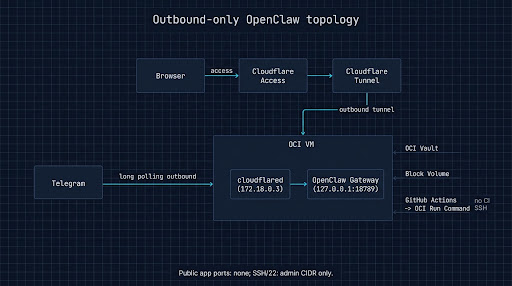
admin_ip_cidr. Every other path is outbound: cloudflared dials out to Cloudflare, the agent polls out to Telegram. The host publishes 127.0.0.1:18789 for loopback checks while the gateway binds lan on the Docker bridge so cloudflared at 172.18.0.3 can reach it. That bridge address is the pinned trusted proxy for source IP verification.The pieces:
openclaw-gateway: the agent (ghcr.io/openclaw/openclaw:2026.8.2-slim),OPENCLAW_GATEWAY_BIND=lanon the bridge, loopback published only for local checks.cloudflared: the tunnel connector (cloudflare/cloudflared:2026.8.2), fixed172.18.0.3, reaches the gateway by container DNS by dialing out.openclaw-data: 50 GB OCI Block Volume, Lower Cost tier, labelopenclaw-data. State outlives the VM.- OCI Vault: source of truth for secrets and durable config. The VM reads them at deploy time via Instance Principal and writes a mode 600
.envfor Compose. CI does not hold VM SSH credentials. - Terraform: owns core infra in
infra/terraform/including the OCI resources and the Cloudflare tunnel and DNS. Remote state lives in OCI Object Storage via an S3 compatible endpoint. The tunnel usescloudflare_zero_trust_tunnel_cloudflared,cloudflare_zero_trust_tunnel_cloudflared_config, and a proxied CNAME to<tunnel-id>.cfargotunnel.comthat routeshttps://openclaw.<domain>tohttp://openclaw-gateway:18789.
Compose networking is pinned for a reason, loopback publish and fixed tunnel IP on a pinned subnet:
services:
  openclaw-gateway:
    image: ghcr.io/openclaw/openclaw:2026.8.2-slim
    environment:
      OPENCLAW_GATEWAY_BIND: lan
    ports: ["127.0.0.1:18789:18789"]
    volumes:
      - /mnt/openclaw-data/.openclaw:/home/node/.openclaw
      - /mnt/openclaw-data/openclaw-workspace:/home/node/.openclaw/workspace
    networks: [openclaw]
  cloudflared:
    image: cloudflare/cloudflared:2026.8.2
    command: tunnel --no-autoupdate run
    networks:
      openclaw:
        ipv4_address: 172.18.0.3
networks:
  openclaw:
    ipam:
      config: [{ subnet: 172.18.0.0/16 }]
Use absolute /mnt/openclaw-data/... paths under ubuntu. The Run Command agent executes as root where ${HOME} is /root, so relative mounts would create empty state in the wrong home.
Three configuration decisions worth copying
1. Two gates, no separate token
The Control UI sits behind Cloudflare Access with GitHub OAuth and explicit allowlisted identities. The edge authenticates first. The gateway then trusts the headers Access attaches, but only from the pinned proxy IP and only for an explicitly allowlisted email. Header trust without source IP verification is header forgery.
The gateway config from scripts/configure-openclaw.sh (CLOUDFLARED_IP=172.18.0.3):
{
  "gateway": {
    "bind": "lan",
    "trustedProxies": ["172.18.0.3"],
    "auth": {
      "mode": "trusted-proxy",
      "trustedProxy": {
        "userHeader": "cf-access-authenticated-user-email",
        "requiredHeaders": ["cf-access-jwt-assertion"],
        "allowUsers": ["you@example.com"]
      }
    }
  }
}
trustedProxies takes literal IPs only, which is why the subnet and the tunnel IP are pinned. OPENCLAW_GATEWAY_TOKEN must be absent from the environment in this mode. The gateway refuses to boot if that variable exists at all, even if auth.token was removed from config. The Vault secret is kept for a fast revert but is not rendered to .env. Grant operator.admin per identity via identityScopes, not blanket via deviceAutoApprove.scopes.
Check the exact email claim Access issues at https://openclaw.<domain>/cdn-cgi/access/get-identity while logged in. If GitHub privacy settings hide the address, the claim can carry a users.noreply.github.com proxy and the allowlist must match what Access actually issues. Keeping the check explicit avoids a silent mismatch where login looks correct but the gateway never matches the allowlist.
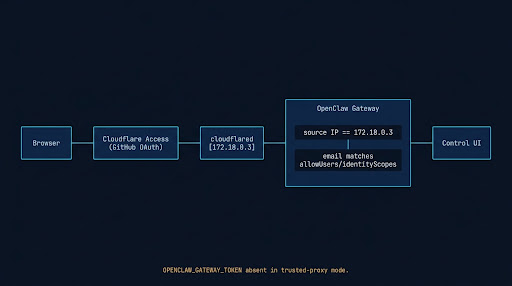
172.18.0.3 and the email is explicitly allowlisted with a per identity scope.2. Cost fences you can see in plan
On a Pay As You Go account, staying at zero is a monitoring problem. The core cost sensitive settings and the budget resource are Terraform managed, while the fine grained alert thresholds are configured in OCI operations. The tripwires that matter:
resource "oci_core_volume" "data" {
  display_name = "openclaw-data"
  size_in_gbs  = "50"
  vpus_per_gb  = "0" # Lower Cost, not Balanced
  lifecycle { prevent_destroy = true }
}
resource "oci_kms_vault" "main" {
  display_name = "openclaw-vault"
  vault_type   = "DEFAULT" # not a Private Vault
}
resource "oci_kms_key" "main" {
  display_name    = "openclaw-key"
  protection_mode = "SOFTWARE" # not HSM
}
Volume backups use a daily incremental policy with five day retention, which keeps temporary backup growth inside the free allocation. A budget named TotalBudget at 10 dollars per month provides the spending guardrail; verify the actual alert setup for your tenancy in the OCI console because alert thresholds there are not all Terraform managed.
Check spend via the usage API, which lags 24 to 48 hours:
TENANCY=$(grep '^tenancy=' ~/.oci/config | cut -d= -f2)
oci usage-api usage-summary request-summarized-usages \
  --tenant-id "$TENANCY" \
  --time-usage-started "$(date -u -v-14d +%Y-%m-%dT00:00:00Z)" \
  --time-usage-ended "$(date -u +%Y-%m-%dT00:00:00Z)" \
  --granularity DAILY \
  --query 'sum(data.items[*]."computed-amount")'
This deployment uses 4 OCPU and 24 GB on Ampere A1 Flex. Oracle Cloud free tier limits and capacity policies change over time, so confirm current Always Free eligibility and limits in your own tenancy before applying this shape. If the included allocation is lower, resize the shape rather than assuming zero cost.
Oracle may also reclaim Always Free resources after a period of low utilization. Treat that as a monitoring consideration and review current reclaim policies for your tenancy.
3. Telegram: one ID to onboard, polling by default
Only TELEGRAM_BOT_TOKEN is read from the environment. Allowlist policy is written to openclaw.json by scripts/configure-openclaw.sh from Vault backed inputs.
TELEGRAM_BOT_TOKEN=...              # from Vault to .env
TELEGRAM_ALLOWED_USERS=123456789    # numeric ID via @userinfobot, comma or space separated
TELEGRAM_ALLOWED_USERS maps to channels.telegram.allowFrom with dmPolicy: allowlist. Adding a second person is one ID in Vault plus a redeploy, no app install. Without an allowlist, dmPolicy defaults to pairing, a short code approved inside the container. Avoid dmPolicy: open.
Polling is the default and fits the outbound only design. No public webhook URL is needed.
Group IDs use negative -100 values and can be found from gateway logs after adding the bot to a group.
The onboarding stays simple on purpose, one identifier and one policy change,
rather than a separate portal or invite flow that would add cost and complexity for little gain.
The auth incident and what it taught
Google OAuth authenticated correctly through Cloudflare Access, but OpenClaw’s trusted-proxy path silently expected a GitHub-backed identity for its secondary identity check. Login succeeded, but application requests failed. Switching the Cloudflare Access identity provider to GitHub fixed it.
The useful lesson is not about this one flag. Edge authentication succeeding does not prove the application accepted the forwarded identity. Debug auth boundaries separately: confirm what the edge actually issued, what the application actually trusted, and where the second check lives. That separation saves hours compared to retesting the same login and assuming the app must be correct because the edge said yes.
Designed for rebuild: disposable compute, durable memory
The VM is disposable, the data is not. Agent state (~/.openclaw, workspace, opencode config) lives on the openclaw-data block volume at /mnt/openclaw-data, not on the boot volume, with home paths as symlinks into it. The block volume is defined in infra/terraform/storage.tf, while the cloud-init template at infra/cloud-init/openclaw.yaml.tftpl contains the mount and symlink recovery recipe. That template is wired into user_data in Terraform, but ignore_changes = [metadata] keeps it inert against the live instance. It only runs on a deliberate relaunch.
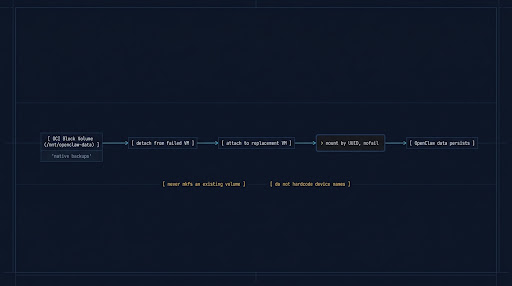
/mnt/openclaw-data with point in time OCI backup policy and reattach by UUID recovery, never a blind mkfs.Four guardrails make rebuild safe.
- Mount by UUID with
nofail.fstabusesUUID=<uuid> /mnt/openclaw-data ext4 defaults,nofail 0 2.nofailkeeps the box bootable if the volume is detached. - Never reformat a volume that already has data. The provision script checks
blkid -s TYPEfirst and skipsmkfswhen a filesystem exists. - Daily incremental backups with five day retention. Native OCI volume backup policy, capped at five days to stay inside the free allocation.
- Restore keeps the low cost performance tier. A restored volume defaults to Balanced and would start billing. Recreate with
vpus_per_gb = "0":
oci bv volume create --source-volume-backup-id <backup-ocid> --availability-domain <ad> \
  --compartment-id "$TENANCY" --display-name openclaw-data-restored --vpus-per-gb 0
Do not hardcode the device letter (/dev/oracleoci/oraclevdb). Udev assigns letters by attachment slot, so the data volume can land on oraclevda while the boot disk keeps partitioned aliases. Find the data device by exclusion, the bare unpartitioned oracleoci symlink that is not the disk backing /. That is what the cloud init template does. Treating the volume as the primary artifact and the VM as replaceable makes testing a rebuild a normal exercise, not an emergency procedure.
Native app access via Cloudflare WARP
The OpenClaw native iOS app uses a separate path from the browser. It checks that the gateway TLS certificate chains to the Access team CA, which a normal Access fronted connection does not satisfy on its own. The fix is to enroll the device in Cloudflare WARP and enable Gateway TLS decryption.
Gateway TLS decryption is account level configuration, while this deployment uses Include mode routing for only the OpenClaw hostname, so only included traffic traverses that path in practice. Adding more included hostnames expands the scope. In this setup, only openclaw.<domain> is included, so other device traffic bypasses WARP entirely.
WARP enrollment itself is gated to the owner email, and Access uses a Bypass policy gated on device posture for WARP connected sessions ahead of the normal Allow policy for GitHub identity. Split tunnel scoping is set via the Cloudflare API, not Terraform. HTTP/3 is disabled for this zone because of an iOS interaction with Gateway, with no functional loss beyond falling back to HTTP/2.
How deploys work
Deploys are manual and outcome led: no SSH connection from CI and no deployment firewall opening.
- Manual GitHub Actions dispatch, not on every push.
- OCI Run Command executes
deploy.shon the VM through the Oracle Cloud Agent. - No SSH connection from CI and no inbound firewall opening for deploys. The VM pulls the requested SHA itself.
- The VM gets secrets through Instance Principal instead of distributing cloud credentials to CI or storing them on disk long term. It then writes a fresh protected
.envwith mode 600 for Compose. - Fresh protected
.envrendered from Vault every deploy, not merged with stale files, so dead keys do not accumulate. - Configuration applied with
scripts/configure-openclaw.sh, restarting only the service that changed, so a no op deploy does not incur a restart. - Docker healthy status gates success. If the gateway does not become healthy, the deploy fails loudly and the job surfaces the recent gateway logs.
One short excerpt shows the shape, from .github/workflows/deploy.yml:
- name: Deploy via OCI Run Command
  run: |
    SHA="${{ github.event.inputs.sha }}"
    [[ -z "$SHA" ]] && SHA="${{ github.sha }}"
    SCRIPT="sudo -u ubuntu -H bash -lc 'set -o pipefail; cd ~/openclaw && git fetch --all --quiet && git checkout --detach ${SHA} && ./deploy.sh 2>&1 | tee -a /home/ubuntu/openclaw-deploy.log | tail -c 60000'"
    # create Run Command, poll for SUCCEEDED, check exit code, fail the job if not 0
Rollback is a checkout of the previous SHA.
Trade offs
This is more process than docker run on a VPS for two containers, but an access policy change shows as a reviewable plan diff, secrets are not long lived files on disk, and rebuild is terraform apply plus a volume reattach, not a migration. A small fix can be reviewed as a plan before it is applied, rather than patched by hand on a live box.
Free tier enforcement and reclaim behavior can change. Each choice that affects cost or durability has a visible setting and a check, but it still requires watching. The budget resource gives a place to anchor that watch, and the usage API gives a way to verify spend, even with its delay.
GitHub is the current identity provider for trusted proxy in this implementation because of the upstream behavior described above. If a Google only org is required, stay on token mode until the upstream path is fixed. The trade is between a cleaner single login now and broader IdP coverage later.
Takeaways
-
Always on with durable memory is the product, not the VM. Disposable compute and durable state on a block volume with UUID mount and point in time backups is how an assistant keeps context, reminders, and follow ups across rebuilds.
-
Outbound only networking reduces what must be defended. The agent polls out, cloudflared dials out, browsers arrive through the tunnel, and the only inbound rule is break glass SSH.
-
One auth layer done well beats two done loosely. Cloudflare Access at the edge plus a pinned trusted proxy, explicit allowlist, and per identity scopes is a single verifiable path. That pattern maps directly to production AI access where identity and scope need to be auditable.
-
Cost and durability need visible fences. Asserting vault type, volume tier, and backup retention in Terraform and verifying spend and reclaim policy in your own tenancy keeps private infrastructure predictable.
-
Design for rebuild from the start. When the rebuild recipe, the volume attach logic, and the deploy flow are ready before they are needed, recovery is routine. That is the difference between a demo and a system you can operate.
Get in touch
The same properties that make this stack useful as a personal assistant are what matter when an AI system touches real data and real operations. Durable state, outbound only networking, identity gated ingress with a narrow break glass path, and infrastructure that shows up as a diff before it is applied. The personal stack is a low cost place to get those mechanics right before scaling them.
If you are working through a self hosted agent, a knowledge system over unstructured data, or an automation that needs to stay operable, the contact page is the fastest way to reach me.